Hard Disk Sentinel DOS Edition (FREE)
By using the DOS edition of Hard Disk Sentinel, it is possible to examine the temperature and health information (and more) of IDE and S-ATA hard disks connected to motherboard or external controller cards and modify acoustic level of such disks. This edition can only be used if the system is running DOS (for example started from a DOS boot floppy disk). Under Windows DOS-box it is NOT working.
List of features
The following information are displayed:
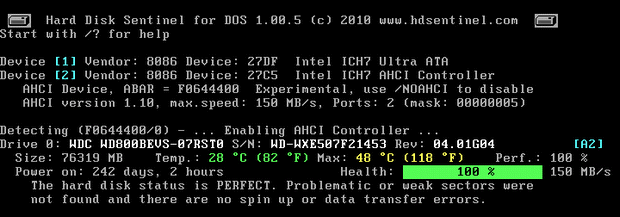
- detected hard disk controllers and their vendor and device IDs. Each device has an associated number (displayed with light blue)
- size, model ID, serial number, revision of all IDE/S-ATA hard disks connected to the motherboard or these devices
- temperature, health and performance values
Note: performance may be different compared to the detected value under Windows because under DOS the UDMA mode may not be selected previously by the BIOS - power on time (days, hour, minutes - if supported)
Note: this is for informational purposes only, the value displayed under Windows (after minutes of testing) is more precise - the controller device or channel and device location (with light blue). Eg. PM = Primary master
Starting from version 1.00.5
- detects and displays information about disks connected to AHCI controllers (Thanks to Jeff Leyda for helping in AHCI development)
- displays full hard disk text description with errors and disk issues found (like the Windows version of Hard Disk Sentinel)
- immediately displays highest temperature ever measured by the hard disk
- it is possible to create bootable USB drives (pendrives, memory cards, smaller hard disks) to diagnose disk with HDSDOS and save reports back to these USB drives
Please read the instructions carefully on creating and using bootable USB drives.
Starting from version 0.04
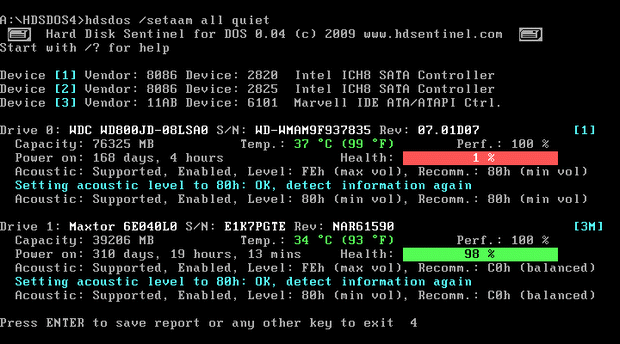
- optionally the acoustic level for each disks if /AAM switch is used
- optionally the complete S.M.A.R.T. details if /SMART switch is used
Because of direct access of hard disks (instead of using drivers), the detection may be better under DOS. For example, all disk information of all disks connected to SiI 0680 controller are displayed under DOS - but under Windows, this controller may provide only limited information. It is also possible to detect and display information about disks in some RAID arrays (for example SiImage).
When the application closes, the exit code is the lowest health value found or 255 if an error occured or hard disk not found at all.
Command line switches
- /N - disable detection of disk controllers and hard disks connected to them
- /H - high compatibility mode
- /M - maximum compatibility mode (use when some hard disk(s) are not detected)
- /D - do not display "save report" option and do not wait
- /R [report.xml] - save report to filename (default: report.xml)
- /A - automatically save report to file name created from current date (MMDDHHMM.xml)
- /TXT - create and save TXT report instead of XML
- /ASK - ask for description and include it in report
- /SEC - display hard disk security status also
- /AAM - display automatic acoustic information also
- /SETAAM drive_num|ALL level(hex)80-FE|QUIET|LOUD - set acoustic level on one or all disks
80 or QUIET is the lowest (most silent) setting, FE or LOUD is the highest (fastest) setting
Examples: HDSDOS /setaam all quiet - sets all drive to most silent
HDSDOS /setaam 0 loud - sets drive 0 to fastest (loud) setting. Same as HDSDOS /setaam 0 FE - /SMART - display SMART information on screen
- /P - pause between pages
- /? - displays help information
If you encounter any problems during the detection, please try /H, /M and/or /N options and let us know. Please include the type of motherboard and/or hard disk controller you use and the details of attached devices (number, connector type).
Please send saved XML or TXT reports, questions or ideas to [email protected] to help improving this tool.
Usage
This edition is FREE. You can freely use it to analyse hard disk status (eg. when you're about to repair/verify/purchase an older used computer). It is useful to make a bootable floppy/CD/Pendrive with FreeDOS and this tool.
Note: it may be required to select "IDE" or "Legacy" mode in the BIOS for SATA controllers. If the SATA controller is configured into "RAID" mode, the detection may not be possible. From version 1.00.5, detection in "AHCI" mode should work also. If you encounter any problems, please let us know.
Downloads
Hard Disk Sentinel for DOS - application only, should be copied to DOS boot device
Hard Disk Sentinel for DOS - installer, creates FreeDOS boot disk with HDS for DOS
Hard Disk Sentinel for DOS - bootable CD ISO image, does not require floppy drive/disk
Hard Disk Sentinel for DOS - Windows executable to make bootable USB drive with HDSDOS (pendrive, memory card)
Please read the instructions carefully on creating and using bootable USB drives.
Updates
1.21
| 20/5/2016 |
|
1.20
| 5/5/2016 |
|
1.00.5
| 15/4/2010 |
|
0.04
| 1/2/2009 |
|
0.03
|
|
0.02
| 16/4/2008 |
|